Client Usage
Upgrading from 0.7? See the 0.7 → 0.8 migration guide.
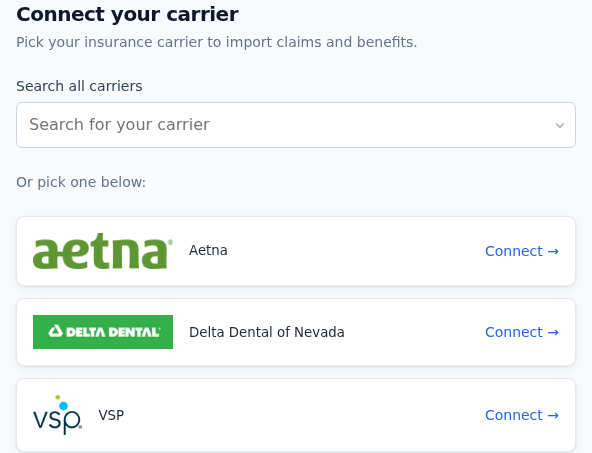
Mount the SDK by calling StreamConnect({...}) with your config. The minimum you need is el (where to mount), employer, user, and apiToken. Everything else has sane defaults.
Quickstart
Via CDN (vanilla HTML, server-rendered, Backbone, jQuery)
<script src="https://app.tpastream.com/static/js/sdk-v-0.8.3.js"></script>
<div id="sdk-hook"></div>
<script>
  window.StreamConnect({
    el: '#sdk-hook',
    employer: { vendor: 'internal', systemKey: 'EMP-123' },
    user: {
      firstName: 'Joe',
      lastName: 'Sample',
      email: 'joe@example.com',
    },
    apiToken: 'YOUR-SDK-TOKEN',
  });
</script>
These CDN forms are supported:
sdk-v-0.8.3.js(current 0.8.x, pinned)sdk-v-0.8.2.js(0.8.2, pinned)sdk-v-0.8.1.js(0.8.1, pinned)sdk-v-0.8.0.js(0.8.0, pinned)sdk-v-0.7.7.js(last 0.7.x, pinned)sdk.js(floating pointer to the latest release; updates automatically when a new version ships)
If you pin, note that you do not pick up fixes automatically. 0.8.3 fixes a bug that made Medical Mutual and SimplePay Health impossible to connect, so pinned integrations on 0.8.0–0.8.2 should move up.
Pinned versions stay available indefinitely. See Migrating from 0.7 to 0.8 for the breaking-change story before flipping the floating pointer in production.
Via npm
npm install stream-connect-sdk
import StreamConnect from 'stream-connect-sdk';

StreamConnect({
  el: '#sdk-hook',
  employer: { vendor: 'internal', systemKey: 'EMP-123' },
  user: { firstName: 'Joe', lastName: 'Sample', email: 'joe@example.com' },
  apiToken: 'YOUR-SDK-TOKEN',
});
If you only want to try the UI without wiring credentials, drop everything except el and add isDemo: true:
StreamConnect({ el: '#sdk-hook', isDemo: true });
Demo mode renders the full UI against synthetic data; it cannot save or validate real credentials.
In a React app
The SDK is shaped as a self-contained widget (it brings its own React internally and mounts into a DOM element you give it), so the canonical React integration is a thin useEffect wrapper:
import { useEffect } from 'react';
import StreamConnect from 'stream-connect-sdk';

export function ConnectSDK({ employer, user, apiToken, ...opts }) {
  useEffect(() => {
    StreamConnect({
      el: '#sdk-hook',
      employer,
      user,
      apiToken,
      ...opts,
    });
  }, []);
  return <div id="sdk-hook" />;
}
Then use it like any component:
<ConnectSDK
  employer={{ vendor: 'internal', systemKey: 'EMP-123' }}
  user={{ firstName: 'Joe', lastName: 'Sample', email: 'joe@example.com' }}
  apiToken={process.env.NEXT_PUBLIC_TPASTREAM_SDK_TOKEN}
/>
A few things to know about this shape:
- The SDK mounts its own React tree inside the
<div>. Host-app React contexts, error boundaries, and refs don't compose into the SDK subtree. - Re-calling
StreamConnect()against the sameelunmounts the previous root cleanly (React 19 + WeakMap-backed root cache), so toggling identity props between renders is safe. - For SSR (Next.js / Remix), the
useEffectruns client-side only; no special guarding needed.
A first-class React package with peerDependencies on react (no second React tree, full composition) may follow in a future release.
Options reference
* in the tables below marks fields you must supply.
Required
| Field | Description | Type | Example |
|---|---|---|---|
el* | A CSS selector for where you want the SDK to render. Everything renders under this element. | String | el: '#sdk-hook' |
apiToken* | Your SDK token. Configured ahead of time by TPAStream; not a secret (safe to ship in browser code). | String | apiToken: 'YOUR-SDK-TOKEN' |
employer.vendor* | The code for the vendor your employer is configured under. Usually internal. | String | employer: { vendor: 'internal' } |
employer.systemKey* | Unique systemKey for your employer on the selected vendor. | String | employer: { systemKey: 'EMP-123' } |
employer.name | Employer display name. Only required when the employer doesn't exist yet (the SDK auto-creates it). | String | employer: { name: 'Acme Corp' } |
user* | The user (member) connecting. Auto-created if not already in our system. Think "the employee entering their carrier credentials," not a TPAStream-staff account. | Object | see below |
user.firstName* | The user's first name. | String | user: { firstName: 'Joe' } |
user.lastName* | The user's last name. | String | user: { lastName: 'Sample' } |
user.email* | The user's email. | String | user: { email: 'joe@example.com' } |
user.memberSystemKey | Your system's stable ID for this user. Lets you cross-reference back from TPAStream webhooks. | String | user: { memberSystemKey: 'mem_42' } |
user.phoneNumber | The user's phone number. | String | user: { phoneNumber: '555-555-5555' } |
user.dateOfBirth | The user's date of birth, YYYY-MM-DD. | String | user: { dateOfBirth: '1985-04-12' } |
tenant | Only needed if your token is configured to multiple tenants. TPAStream will tell you when this applies. | Object | tenant: { vendor: 'internal', systemKey: 'tenant-key' } |
Theme
| Field | Description | Type | Default |
|---|---|---|---|
theme.primaryColor | CSS color (hex, rgb, named) used to recolor buttons, links, focus rings, and progress bars. Scoped to the SDK subtree via .tpa-sdk-root; won't bleed into host-page CSS. See Theme. | String | built-in indigo |
Behavior
| Field | Description | Type | Default |
|---|---|---|---|
isDemo | Renders the SDK against synthetic data. Cannot save or validate real credentials. Useful while iterating on styling. | Boolean | false |
realTimeVerification | Show the credential-validation UI after submit. The 0.8 SDK uses an SSE stream (replaces the 0.7 polling loop) and renders validation in a non-blocking hero plus corner panel rather than blocking the carrier picker. Pass false to submit and advance immediately with no validation UI. | Boolean | true |
enablePatientAccessAPI | Default flipped to true in 0.8. PAA-routed payers (carriers that authenticate via redirect to the carrier's own site rather than collecting credentials inline) take the OAuth-popup branch. With this off, they fall through to a raw credentials form that exposes an interoperability_refresh_token field no real user can fill. See Interop. | Boolean | true |
enablePatientAccessAPISinglePage | Same as enablePatientAccessAPI but performs the redirect in the current tab instead of a new window. Takes precedence over enablePatientAccessAPI when true. | Boolean | false |
forceEndStep | Skip directly to the end widget on load. Accepts the legacy boolean form (true → end widget) or an explicit step number (5 is the FinishedEasyEnroll step). Auto-applied when the URL contains ?forceTPAStreamSdkEnd=1 (the flag is then stripped from the address bar). | Boolean or Number | false |
includePayerBlogs | Enable optional payer-updates blog on each enrollment form. Shows additional info about the carrier. | Boolean | false |
connectAccessToken | Required if Connect Access Token advanced security is enabled. The 0.8 SDK also accepts a fresh ?accessToken=... on the URL after a Patient Access API redirect; if present, it overrides this option for that load and is stripped from the URL via history.replaceState. | String | unset |
connectAccessTokenRefreshFn | Async function the SDK calls to mint a fresh connectAccessToken when the current one has expired (server returns error_code: "expired_connect_token"). When provided, expired-token responses trigger a transparent refresh + retry instead of bubbling up as a failed request. Without it, the SDK fires onConnectAccessTokenExpired and dispatches a tpastream-connect-token-expired window event so the host page can prompt the user. Connect tokens have a ~60-minute TTL, so long-lived pages benefit. | () => Promise<string> | unset |
renderChoosePayer | Render the built-in choose-payer widget. If false, you drive payer selection from the doneChoosePayer callback. | Boolean | true |
renderPayerForm | Render the built-in credentials form. If false, drive it from doneCreatedForm. | Boolean | true |
renderEndWidget | Render the built-in end widget. If false, drive it from doneEasyEnroll. | Boolean | true |
Lifecycle callbacks
| Callback | Fires when |
|---|---|
doneGetSDK({ user, payers, tenant, employer }) | Initial SDK bootstrap completes. First callback in the flow. |
doneSelectEnrollProcess() | The select-enroll cards finish rendering (member-portal mode only; requires connectAccessToken). |
doneFixCredentials() | The user clicked the "Fix Credentials" card in member-portal mode. |
doneChoosePayer({ choosePayer, usedPayers, dropdown, streamPayers }) | The choose-payer widget renders. With renderChoosePayer: false, this passes the props you need to drive payer selection yourself. |
doneCreatedForm({ formJsonSchema, returnToChoosePayer, streamPayer, streamTenant, tenantTerms, toggleTermsOfUse, validateCreds }) | The credentials form renders. With renderPayerForm: false, drives a fully custom form. |
doneTermsOfService() | The user clicked the TPAStream Terms of Service link. |
donePopUp() | The user clicked the help (?) icon on the payer info card. |
donePostCredentials({ params }) | The user submitted credentials and the SDK is posting them. Use to mirror the payload into your own backend. |
doneRealTime() | The realtime-validation widget rendered. Never fires when realTimeVerification: false. |
doneEasyEnroll({ employer, payer, tenant, policyHolder, user, returnFlowFunction }) | Final callback; the enrollment is saved (possibly pending validation). |
handleInitErrors(error) | An init-configuration error happened before the SDK could mount. |
handleFormErrors(error, { response, request, config }) | Credential submit failed. The SDK shows the error to the user; this lets you log it. |
onConnectAccessTokenExpired() | The connectAccessToken expired mid-session and either no connectAccessTokenRefreshFn was provided or the refresh attempt failed. Use to surface a "session expired, please reload" UI on the host page. Also dispatched as a tpastream-connect-token-expired window event for integrations that prefer a global listener. |
Each callback is documented in detail below.
Deprecated
These still work and will continue to indefinitely; the SDK logs a one-time console warning when it sees them. Migrate at your leisure.
| Field | Use instead | Notes |
|---|---|---|
sdkToken | apiToken | Same value. If both are set, apiToken wins. |
enableInterop | enablePatientAccessAPI | Renamed in 0.8. |
enableInteropSinglePage | enablePatientAccessAPISinglePage | Renamed in 0.8. |
fixCredentials | (remove) | Member-portal mode is now derived automatically from the presence of connectAccessToken; the flag is ignored. |
realtimeTimeout | (remove) | Was the polling-loop timeout in 0.7.x. 0.8 uses SSE with a server-side stream deadline (~10 minutes). No-op. |
maxRetries | (remove) | Was the polling-loop retry count. 0.8 has no client-side retry knob. No-op. |
userSchema | (remove) | In 0.7.x this drove react-jsonschema-form UI-schema customization. react-jsonschema-form was replaced by React Hook Form + zod in 0.8, so userSchema no longer affects rendering. The object is forwarded into the credential-submit payload for downstream consumers. |
Internal / dev-only
Don't set these in production code.
| Field | What it's for |
|---|---|
_overrideBaseUrl | Points the SDK at a different API host. Used by the /sdk-test sandbox on stevedev.tpastream.com and integration tests. |
webViewDelegation | Enables redirection-delegation to a top-level WebView host. The interop final redirect goes to /patientaccessapi/sdk-interop-done-delegation/<state>/<ph> for the host app to parse instead of sdk_interop_done or window.location. |
entrySdkStateId | Overrides the SDK-generated state id to preserve SDK flow logs across a webViewDelegation round trip. |
Redirect query parameters (Patient Access API)
When the Patient Access API flow returns the user from a carrier site back to the page hosting the SDK, the redirect URL can carry two query parameters that the 0.8 SDK reads automatically on init:
?accessToken=...: a fresh connect-access token minted byapp.tpastream.comafter the carrier redirect completes. The SDK reads it on load, uses it for the remainder of the session, and (regardless of whetherconnectAccessTokenwas already set in the init object) takes the URL value as the freshest. The token is single-use.?forceTPAStreamSdkEnd=1: set by the redirect URL the SDK constructs whenenablePatientAccessAPISinglePageistrue. Flags the OAuth return. As of 0.8.2 the SDK surfaces a self-dismissing "Connected" toast in the floating panel and lands the member on the carrier picker so they can add another carrier — it no longer forces the full-page end widget. (WithrealTimeVerification: falsethere's no panel, so it falls back to the end widget.) The explicitforceEndStepinit option below is unaffected.
Both parameters are stripped from the URL via history.replaceState after the SDK reads them. replaceState (not pushState) is used deliberately: the back button cannot restore the original URL, so the single-use access token cannot leak via history navigation or browser autofill.
Referrer caveat:
replaceStateruns only after the SDK script has loaded and executed. Any resources, third-party scripts, or analytics beacons fetched earlier in the page lifecycle can still receive the token-bearing URL in theRefererheader. For the full referrer-protection story (host-page<meta name="referrer">settings, CSPContent-Security-Policy: referrer, and the redirect-URL hygiene we recommend), see the Pre-SDK referrer caveat inconnect-access-token.md.
You don't need to handle these parameters yourself; this section documents them so integrators who inspect the URL or rely on popstate events know what to expect.
Lifecycle callbacks (in detail)
The main way an implementor interacts with the SDK is via callbacks fired at key flow points. See SDK Flow for a visual lifecycle diagram. Most callbacks pass useful data; some are pure styling hooks.
doneGetSDK
First callback in the SDK flow. Fires after the initial request to TPAStream completes.
Data passed back:
useremail: the same email you set in config.user_id: TPAStream's unique identifier for this user.policy_holders: all policy_holders already associated with the user (think "previously saved credentials per carrier"). Limited shape:payer_ididandpolicy_holder_id: same value, both surfaced for legacy reasons. Useful for matching webhook events back to the SDK session.
tenantidandtenant_idnameterms_of_use_message: configured at the tenant level. Use if you build a custom terms widget.
payers: list of{id, payer_id, logo_url, name}. Use whenrenderChoosePayer: false.employeridandemployer_idnamepayers: the preferred payers configured for this employer.show_all_payers_in_easy_enroll: whentrue, all payers TPAStream supports render as options. Defaulttruefor an employer the SDK auto-creates.support_email_derived: configured in the TPAStream app.
StreamConnect({
  el: '#sdk-hook',
  // ...
  doneGetSDK: ({ user, payers, tenant, employer }) => {
    // Mirror identity into analytics, etc.
  },
});
doneSelectEnrollProcess
Fires after doneGetSDK when the SDK is in member-portal mode (a connectAccessToken was supplied). Use for styling the two select-enroll cards.
StreamConnect({
  el: '#sdk-hook',
  // ...
  doneSelectEnrollProcess: () => {
    // Style the cards
  },
});
doneFixCredentials
Fires after the user clicks the Fix Credentials card in member-portal mode. Member-portal mode only.
StreamConnect({
  el: '#sdk-hook',
  // ...
  doneFixCredentials: () => {
    // Style the fix-credentials view
  },
});
handleInitErrors
Fires when the SDK can't initialize (missing el, missing required option, etc.). The error has a message you can surface to the user.
StreamConnect({
  el: '#sdk-hook',
  // ...
  handleInitErrors: (error) => {
    console.error('TPAStream SDK init failed:', error.message);
  },
});
doneChoosePayer
Second callback in the SDK flow. Fires when the choose-payer widget renders.
With renderChoosePayer: true (default), no parameters; use this callback purely for styling.
With renderChoosePayer: false, the callback receives the props you need to drive your own picker:
choosePayer({ payer }): call this when the user picks a payer. The payer object should come fromstreamPayers. The SDK then renders the next step.usedPayers: list ofpayer_ids that already have credentials.dropdown:trueif the SDK intends a full-payer dropdown (same asemployer.show_all_payers_in_easy_enrollfromdoneGetSDK).streamPayers: full list of payers for this SDK instance.
StreamConnect({
  el: '#sdk-hook',
  // ...
  renderChoosePayer: false,
  doneChoosePayer: ({ choosePayer, usedPayers, dropdown, streamPayers }) => {
    const onPick = (payerId) => {
      const payer = streamPayers.find((p) => p.id === payerId);
      choosePayer({ payer });
    };
    renderMyCustomPicker({
      payers: streamPayers,
      withCredentials: usedPayers,
      onPick,
    });
  },
});
doneCreatedForm
Third callback in the SDK flow. Fires when the credentials form renders for the chosen carrier.
With renderPayerForm: true (default), this is a pure styling hook (no useful parameters).
With renderPayerForm: false, you receive the props you need to drive a fully custom form:
formJsonSchema: the JSON Schema for this carrier's credential form, including security questions and field requirements. Drive your own renderer from this shape. (In 0.7.x the SDK rendered this withreact-jsonschema-form; that library was removed in 0.8, but the schema itself is unchanged and still emitted on this callback for custom integrations.)returnToChoosePayer(): reset to the carrier picker.streamPayer: the carrier object for this form.streamTenant: the tenant object. Useful for adjusting copy.tenantTerms: custom terms-of-service configured by the tenant.toggleTermsOfUse(): opens the Terms of Use overlay.validateCreds({ params }): submit the form. Triggers the realtime-validation path.
StreamConnect({
  el: '#sdk-hook',
  // ...
  renderPayerForm: false,
  doneCreatedForm: ({
    formJsonSchema,
    returnToChoosePayer,
    streamPayer,
    streamTenant,
    tenantTerms,
    toggleTermsOfUse,
    validateCreds,
  }) => {
    // Render your form from formJsonSchema; on submit call validateCreds({ params }).
  },
});
doneTermsOfService
Fires when the user clicks the TPAStream Terms of Service link. Pure styling hook.
StreamConnect({
  el: '#sdk-hook',
  // ...
  doneTermsOfService: () => {},
});
donePopUp
Fires when the user clicks the help (?) icon on the payer info card to open the carrier-specific help drawer. Pure styling hook.
StreamConnect({
  el: '#sdk-hook',
  // ...
  donePopUp: () => {},
});
donePostCredentials
Fires when the user submits the credentials form and the SDK is posting them. Use to mirror the payload into your own backend before the SDK advances to validation.
Common payload fields (vary by carrier):
paramsusernamepassworddate_of_birthtermsAndServicesandaccept: user accepted the TPAStream terms of use.payer_idtenants_accept: list of booleans, one per tenant the user accepted terms for.tenantAcknowledgement: user acknowledged the carrier-data-sharing notice.security_question_first/security_question_first_choicesecurity_question_second/security_question_second_choicesecurity_question_third/security_question_third_choice
In 0.8 the credential-submit response also includes a task_token (a short-lived task-scoped JWT bound to the validation task) that the SDK uses internally to subscribe to the /v3/sdk/progress/<task_id>/stream SSE channel. You don't need to handle the token; the SDK uses it transparently. The token is audience-locked to sdk:sse:progress, valid for 10 minutes, and tied to the submitting user.
StreamConnect({
  el: '#sdk-hook',
  // ...
  donePostCredentials: ({ params }) => {
    saveToYourBackend(params);
  },
});
handleFormErrors
Fires when the credential submit fails. The SDK already shows the error to the user; this callback lets you log or instrument it.
errorerror_partsresponserequestconfig
StreamConnect({
  el: '#sdk-hook',
  // ...
  handleFormErrors: (error, { response, request, config }) => {
    console.error('Credential submit failed', error, response);
    sendToYourLogger(error);
  },
});
doneRealTime
Fires when the realtime-validation widget renders. Never fires when realTimeVerification: false. Pure styling hook.
StreamConnect({
  el: '#sdk-hook',
  // ...
  doneRealTime: () => {},
});
doneEasyEnroll
Final callback. Fires when enrollment is saved (possibly still pending validation).
Properties:
employerpayertenantuserpending:trueif the policyHolder is still pending validation.endingMessage: backend-provided message tailored to the credential status.policyHolder: the saved policy_holder.policy_holder_idpayer_idlogin_correction_message: only populated whenlogin_problemis something other than'valid'ornull.login_needs_correction:trueif credentials were flagged invalid by realtime validation.login_problem: one of:'valid': credentials are fine. Claims should start collecting shortly.'invalid': the crawl engine confirmed bad credentials. The user will be prompted to re-enter them.'locked': the carrier has locked this account. Requires user action on the carrier's site to resolve.'broken': the crawl engine identified an issue requiring carrier-side fixes to make progress.'needs_two_factor': the carrier requires 2FA on this login. The 0.8 SDK handles 2FA inline in the validation hero (method picker, code entry); customers who burn through 2FA prompts and reach a terminal failure end up here.'incomplete': the user's carrier-site registration is incomplete. Requires user action to resolve.'inactive': the account is inactive on the carrier site.'sec_question': security-question answers were wrong. The user will be prompted to re-enter them.'wrong_secondary': the account is configured with an unsupported secondary authentication method. The user will be prompted to switch the account to security questions.null: still being confirmed. Can take up to 24 hours depending on carrier-site uptime.
With renderEndWidget: true (default) you also get:
returnFlowFunction(): restart the SDK or return to the payer form, depending on whether credentials were valid.
StreamConnect({
  el: '#sdk-hook',
  // ...
  doneEasyEnroll: ({
    employer,
    payer,
    tenant,
    policyHolder,
    user,
    returnFlowFunction,
  }) => {
    if (policyHolder.login_problem === 'valid') {
      analytics.track('enrollment_succeeded', { payer: payer.name });
    }
  },
});