Fix Credentials
The fix-credentials view lets a returning user see and act on every carrier they've connected: reconnect a broken login, finish a 2FA challenge, or add a new carrier. The SDK enters this mode automatically when a Connect Access Token is supplied at init; no separate flag is required.
Init options
StreamConnect({
  el: '#react-hook',
  apiToken: 'your-sdk-token',
  connectAccessToken: '<minted server-side, see connect-access-token.md>',
  // ... rest of init
});
connectAccessToken(string) - presence of this token is the signal for member-portal mode. See Connect Access Token for how it's minted and rotated.
Deprecated: a
fixCredentials: trueinit option used to opt into this view. It is no longer needed in 0.8 and is ignored (passing it logs a one-time console deprecation warning); behavior is now driven entirely byconnectAccessTokenpresence, which was already a hard requirement.
What the user sees
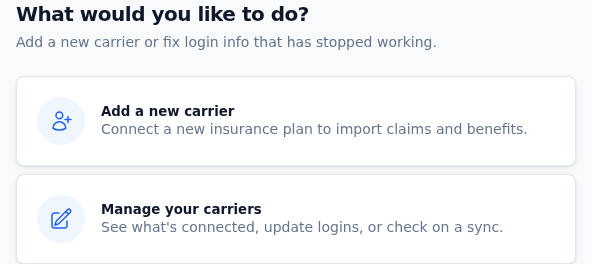
When a returning user opens the SDK in fix-credentials mode, the first screen offers two paths: add a new carrier, or manage existing ones.
The fix-credentials view lists every policy-holder the user has connected. Each carrier renders as a tile with:
- The carrier logo and name
- A status badge (described below)
- "Last synced N min/hr/day ago" when there's a recent successful crawl
Status badges
Each tile shows a status badge driven by the PH's login_problem and
the recency of the last successful crawl. The label space is two
coarse fallbacks plus a per-problem set:
| Badge text | When it fires |
|---|---|
| Connected | Severity is ok. That covers two cases: (a) login_problem is null, regardless of last-sync recency, and (b) login_problem is a warning-class value but a successful sync landed in the last 7 days, which downgrades the warning visually. See severityFor for the exact rule. |
| Validating now | A validation task is in flight against this PH. The tile pulses; the floating hero (top of the page) shows live progress. |
| Action needed | Severity is warning or critical but login_problem is null (we know something needs attention but the carrier didn't tell us what). |
| Per-problem text | Severity is warning or critical and login_problem is set. The badge uses the human label from LOGIN_PROBLEM_LABELS (e.g. Invalid password, Locked account, Needs 2FA, Security question) so the user knows what to fix before clicking. |
Severity classes (canonical sets in
assets/sdk/types.ts CRITICAL_LOGIN_PROBLEMS
and WARNING_LOGIN_PROBLEMS):
ok: nologin_problem, OR a warning-class problem with a successful sync in the last 7 days (the recent claim flow downgrades the warning visually).warning:login_problemin{incomplete, needs_two_factor, sec_question, wrong_secondary, mfa_carrier, migrating}. The carrier is reachable, the user just has an outstanding action item.critical:login_problemin{invalid, invalid_username_format, locked, broken, invalid_interop_token}. The carrier is unreachable until the user reconnects.
The label and severity logic live in
assets/sdk/components/PayerImages.tsx
(labelFor / severityFor / LOGIN_PROBLEM_LABELS). Severity maps
to badge color via the tpa- theme tokens, so a customer-supplied
theme.primaryColor doesn't recolor the semantic
status states.
Sort order
Tiles are sorted top-to-bottom by:
- In-flight validations (the carrier the user just submitted)
- Critical-broken PHs (Reconnect)
- Warning PHs (Action needed)
- Healthy PHs, most-recently-synced first
This puts the carriers that need attention at the top, with the just-submitted one always visually pinned next to the hero.
"Recently added" section
PHs created in the last 7 days are grouped into a "Recently added" section above the main list, so the user can see what they just connected without scrolling. The remaining carriers render under "Your other carriers" (or "Your carriers" if there's no recent section).
Empty state
A user with no connected carriers sees:
You haven't connected any carriers yet.
with a single "Your carriers" heading. Selecting a carrier from choose-payer is still reachable via the "Add a new carrier" entry point.
Reconnecting a carrier
Clicking any tile with Reconnect or Action needed lands the user on the credentials form for that carrier, pre-filled with the username on file. The submit returns the user back to the fix-credentials list with the new validation in flight (visible in the hero + on the tile as "Validating now").
The wizard does NOT take over the screen during validation; multiple validations can run in parallel and the user can keep navigating.
Adding a new carrier from fix-credentials
Users in member-portal mode see an "Add a new carrier" entry that drops them into the standard choose-payer flow (step 3). Submit returns them to the choose-payer picker (step 3), NOT the fix-credentials list, so they can chain another "Add a new carrier" without an extra back-button trip. The freshly-added carrier shows up in the picker's "already connected" markers via the user-refresh that follows the submit.
To get back to the fix-credentials list itself the user uses the back button or navigates back from choose-payer.
(Implementation note: the return-step logic at
SDK.tsx returnStep uses
state.policyHolderId to distinguish "reconnect existing" (PH set →
return to step 2, the fix-credentials list) from "add new" (PH null
→ return to step 3, the picker).)
Hooks for custom rendering
doneFixCredentials- fires once per render of the fix-credentials view, after data loads. Useful for analytics or applying custom styling.doneSelectEnrollProcess- fires when the legacy "Reconnect or Add new" select screen renders. The 0.8 view collapses that selection into the carrier-tile list, so this fires once at mount and is primarily kept for back-compat.
See also
- Theme for branding the SDK shell (the status badges
use semantic colors that aren't affected by
theme.primaryColor) - Connect Access Token for the security setup member-portal mode requires
- SDK Flow for the broader step machine the fix-credentials view plugs into